Climate and Voice - Help Center
Find quick answers and learn to listen to your team with ease, frequency, and meaning.
What is a pulse survey?
A pulse survey is a quick, short-question survey designed to gauge the team's current "beat." It captures fresh insights into climate, alignment, and experience—without bureaucracy.
It works because it's short enough not to be tiresome, frequent enough to show trends, and specific enough to generate action. Companies that use pulses see signs early, adjust the pace, and strengthen the culture before problems become noise.
It's continuous, light, and practical listening—just the way a healthy culture needs to thrive.
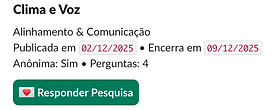
How to create Atmosphere and Voice, the pulse of Brilhou?
You can create a pulse in two ways:
Using one of our templates: there are 6 ready-made templates, each focused on an important theme (climate, culture, motivation, alignment, collaboration, change). Just choose, review, and send.
Creating from scratch: customize your own questions and write your pulse in the way that makes the most sense for your team.
In both cases, the pulse is ready in a few seconds and can be sent via Slack.

How many questions can I use?
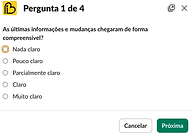
Each Brilhou pulse contains 3 multiple-choice questions and 1 open-ended question.
This format is ideal for frequently listening to the team without taking up too much time and maintaining high participation — climate studies show that short questionnaires increase response rates and reduce fatigue bias, ensuring more honest and consistent perceptions over time.
How many questionnaires should be sent out at a time?
You can create as many drafts as you want, but only one active pulse at a time—that's the one that's visible and available for the team to respond to.
If you want to maintain continuous active listening, you can set up a pulse cadence (for example, weekly or bi-weekly). This way, different themes are explored over time, without overwhelming the team and maintaining the habit of listening and acting frequently.
How do I manage my research?
You manage your pulses directly through the action buttons:
Activate — to put the pulse on air and make it available to the team.
Pause — to temporarily stop sending replies.
Resume — to continue where you left off.
Cancel — to completely end the pulse.
Remember: only one survey can be active at a time.
You can have multiple drafts, but only the active pulse is visible and available for the team to respond to.

How can I view the answers and results?
After the pulse is finished, you can download a .csv file containing all the answers. This file includes:
the participation rate
the answers to the multiple-choice questions
all comments open (qualitative)
With this data, you can quickly see what's working, what needs attention, and where there's room to further enhance the team's performance.

See it in practice.
Watch the videos and see Brilhou in action in just a few seconds.


