It shone - Help Center
Everything you need to recognize, celebrate, and make culture shine.
How do I send and receive Brilhous messages on Slack?
To send Brilhous
You can use whichever method you prefer:
On Slack: type / and /shone or click Send Recognition on the Home screen.
The form will open. Then just:
Choosing who receives
Specify how many Brilhous you wish to send and the associated value.
Write the acknowledgment (and, if you want, add a gif or image)
To send.
Upon receiving, it shone.
When someone sends you Brilhous, they appear in one of your Slack channels — the recognition is public.
This exists so that the team can see and celebrate the attitudes that make the culture shine, reinforcing positive behaviors and strengthening the sense of community.

Can I earn Brilhous by answering surveys?
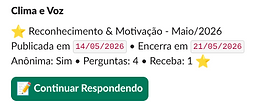
Yes — if your company has set up that option. When enabled, you automatically receive Brilhous when responding to climate or culture surveys.
Brilhous points are added to your balance and can be used normally — to recognize colleagues or exchange them for vouchers and experiences.
How can I check my available balance?
Use the / balance command in Slack.
It shows how many Brilhous you can still send and how many you've received in the last 30 days.

Where can I see the recognitions I've given and received?
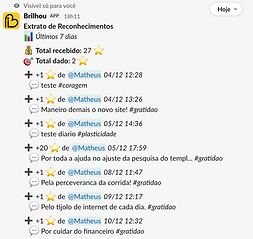
Use the /balance statement command in Slack.
It shows how many Brilhous you can still send and how many you've received in the last 30 days.
What is the "Values that Shine" ranking?
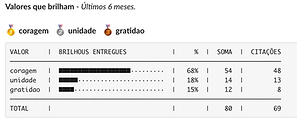
This is a summary of the values most recognized by the team in recent months.
What do the bars in "Brilhous Entregues" mean?
They show how many awards each value has received.
What does "%" mean?
The proportion of recognitions of that value in relation to the total.
What is "Soma"?
The total number of Brilhous points sent for each value.
What are "Quotes"?
How many times was the value mentioned in the acknowledgment texts?
See it in practice.
Watch the videos and see Brilhou in action in just a few seconds.


